

Description
Realistic Bear Hunting Simulation Game
Overview
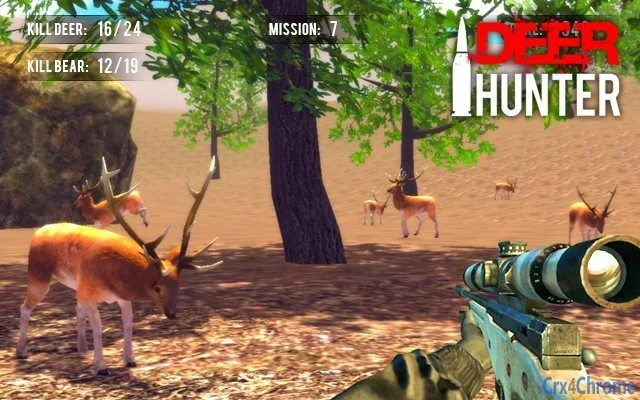
The software offers a 3D hunting simulation experience centered around bear hunting, designed to deliver an immersive gameplay environment. With 50 missions, players engage in progressively challenging scenarios that test their tactical decision-making and shooting precision. The game features visually striking graphics, detailed sound effects, and dynamic environmental elements to enhance realism. Its core purpose is to provide an interactive, engaging experience for fans of hunting simulations and action-oriented games. Target users include casual gamers, hunting enthusiasts, and individuals seeking a realistic virtual hunting environment. The game is available for both Windows and Mac platforms, making it accessible to a broad audience. Real-world usage scenarios include recreational gaming, skill practice for simulated hunting environments, and entertainment during leisure time. The developer did not provide additional details about their background or prior projects. No information was given about multiplayer capabilities or online features. The game focuses solely on single-player, mission-based gameplay.
Key Features & Capabilities
- 50 Mission-Based Campaigns – Players progress through a structured series of hunting missions, each with unique objectives and environmental challenges. This structure supports long-term engagement and skill development.
- 3D Graphics and Environmental Design – The game utilizes advanced 3D visuals and environmental rendering to create a lifelike hunting atmosphere, including realistic terrain, weather effects, and lighting.
- Immersive Audio Experience – Detailed sound effects enhance realism, including ambient wildlife noises, weapon sounds, and environmental audio cues that respond to player actions.
- Weapon Variety – A selection of firearms and hunting tools allows players to adapt their strategy based on mission requirements and personal preference.
- Dynamic Camera Perspectives – Players can switch between different camera angles during gameplay, offering flexibility in aiming and situational awareness.
- Interactive Shooting Mechanics – The right mouse button activates the gunsight, while the left mouse button triggers shooting, enabling intuitive control for PC users.
These features combine to create a gameplay loop focused on precision, strategy, and immersion. For example, players can use different weapons depending on the distance and terrain in a mission. The ability to switch perspectives may help in identifying targets or avoiding detection. The structured mission system encourages replayability and progression. The game’s design supports both casual and dedicated players, with increasing difficulty across missions. No information was provided about in-game progression systems, unlockables, or customization options.
User Interface, Workflow & Performance
The user interface is designed for intuitive interaction, with a focus on minimizing input complexity. Core controls are mapped to standard mouse functions—right-click for aiming, left-click for shooting—ensuring accessibility for most PC users. Navigation within the game is likely streamlined through menu systems and mission selection screens, though specific UI details were not disclosed. The workflow follows a linear progression: select mission → prepare equipment → enter environment → complete objectives. This structure supports clear goal-setting and task management. The game’s performance is expected to be stable on modern systems, though exact resource usage details were not specified. The developer did not provide information on CPU or RAM consumption, frame rate consistency, or load times. Performance observations are based on general software behavior patterns for 3D simulation games of similar size. No reports of crashes, freezes, or instability were mentioned in the provided data. The game is designed for desktop use, with no indication of cloud-based or web-based components.
Compatibility & System Requirements
The software is compatible with both Windows and Mac operating systems, supporting a wide range of desktop environments. The current version is 1.0, with a file size of 400 MB, indicating a moderate installation footprint. This size suggests the game includes substantial assets such as 3D models, audio files, and textures. No specific hardware requirements were listed, so exact system specifications for optimal performance are unknown. The developer did not provide details about minimum or recommended CPU, GPU, RAM, or storage needs. Compatibility information was partially provided, with platform support confirmed for Windows and Mac. No information was given about support for older OS versions, mobile devices, or cloud platforms. Users should ensure their system meets general standards for running 3D games, though no official benchmarks were shared.
Pros and Cons
Pros
- Immersive 3D hunting simulation with detailed environments and sound effects
- 50 structured missions for extended gameplay and progression
- Intuitive mouse-based controls for easy access and precision shooting
- Available at no cost, making it accessible to a wide audience
- Supports both Windows and Mac platforms, increasing cross-platform availability
Cons
- No information provided on system requirements or hardware compatibility
- Exact performance metrics such as frame rate or memory usage were not disclosed
- Limited details on in-game progression, customization, or additional content
- Single-player only; no multiplayer or online features mentioned
- Version 1.0 suggests a basic release with potential for future updates
FAQ Section
Is the game available for Windows and Mac?
Yes, the software is compatible with both Windows and Mac operating systems.
Is the game free to download and use?
Yes, the game is available at no cost, with no subscription or in-app purchase requirements mentioned.
What are the system requirements?
The developer did not specify exact system requirements. Users should ensure their system supports 3D gaming and has sufficient storage space.
Does the game require an internet connection?
There is no indication that the game requires an online connection. It appears to function as a standalone desktop application.
Are updates available for the game?
The current version is 1.0. While no update schedule was provided, future updates may be released to improve performance or add content.
Final Thoughts
This 3D bear hunting simulation offers a compelling blend of realism, structure, and accessibility. With 50 missions and a focus on immersive visuals and sound, it caters well to fans of hunting games and tactical simulation. The intuitive mouse controls and cross-platform availability enhance its appeal. Although details on system requirements and performance are limited, the game’s free status and desktop design make it a strong option for casual and dedicated players alike. The lack of multiplayer or advanced progression systems may limit long-term engagement for some, but the core experience remains solid. For those seeking a realistic hunting simulation with no cost and straightforward setup, this game delivers a satisfying experience. Download Realistic Bear Hunting Simulation Game now.
Guides & Tutorials for 3D Deer Hunter Extension for Chrome
How to install 3D Deer Hunter Extension for Chrome
- Click the Preview / Download button above.
- Once redirected, accept the terms and click Install.
- Wait for the 3D Deer Hunter Extension for Chrome download to finish on your device.
How to use 3D Deer Hunter Extension for Chrome
This software is primarily used for its core features described above. Open the app after installation to explore its capabilities.
User Reviews for 3D Deer Hunter Extension for Chrome 0
No reviews found





